

Tools
Tools are what an agent uses to act: search the web, run code, read your files, query a connector. The agent decides when to use them; you see each step in its reply.
See what the agent did
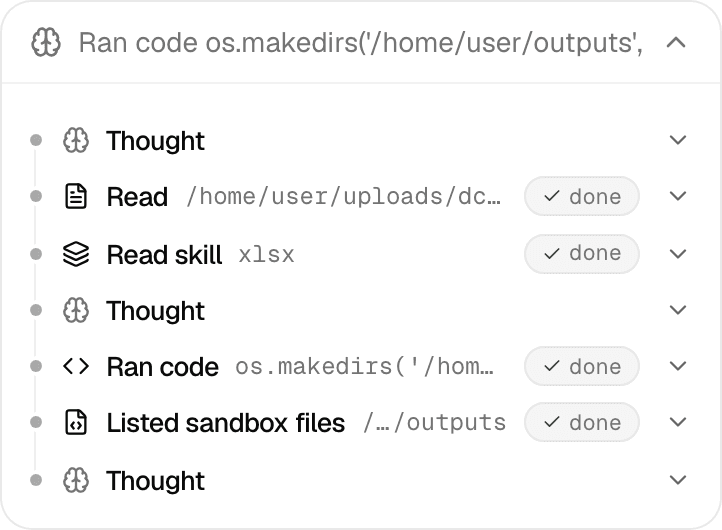
While the agent works, its steps show in a box above the reply: thinking, then each tool it uses. When it finishes, the box collapses to one line, such as Thought for 5s · Ran code … · +2 more. Select it to see every step, and select a step to see its input and result.
A web search step shows what the agent searched for and links to each result.
Tools every agent has
| Tool | What it does | Needs on the deployment |
|---|---|---|
| Run code | Runs Python in the agent's own sandbox, a private computer for this chat. Charts, documents and other files it saves come back as files in the reply. | The code sandbox |
| Shell and files | Runs shell commands, and reads, writes, edits and searches files in the sandbox. | The code sandbox |
| Ask you | Asks you multiple-choice questions. See Plan mode, questions and approvals. | |
| Schedule a task | Sets up a scheduled task after you approve it. See Schedule an agent. | The scheduler |
Every agent can also open the files you attach, and an agent with skills reads them when it needs them. See Work with files in a chat and Skills.
Tools an agent can be given
A custom agent has the tools its builder turned on; see Configure an agent. The editor's tool list offers the four web tools, Generate Image, Analyze Video, Progress Checklist and Extract Tables. Call Agent comes with sub-agents, the connector tools with the agent's connections, and the other Library tools with its knowledge.
| Tool | What it does | Needs on the deployment |
|---|---|---|
| Web Search | Searches the web and returns titles, links and snippets. | A web search service |
| Web Extract | Reads the full text of pages it has links to. | A web search service |
| Web Crawl | Reads the pages of a site, starting from one address. | A web search service |
| Web Map | Lists the pages of a site without reading them. | A web search service |
| Generate Image | Creates, edits or combines images. | Google Gemini and the code sandbox |
| Analyze Video | Summarizes or answers questions about a YouTube video; long videos are analysed in parts. | Google Gemini |
| Call Agent | Hands a self-contained task to another agent and gets its report back. See Sub-agents. | |
| Progress Checklist | Shows a checklist of the steps the agent is working through, updated in place. | |
| Connector Metadata, Query Data Source | Reads a connection's structure, and runs queries or actions on it. | Connectors |
| Semantic Search, List Files, Get File URL, Extract Tables | Search, list and open Library files, and pull tables out of documents. | The Library |
What Alo uses in a chat
Alo, the default agent, comes with run code, the sandbox tools, Web Search, Generate Image, Analyze Video and Call Agent. The composer adds tools as you go:
| You | Alo also gets |
|---|---|
| Send any message | Web Extract |
| Turn on a connector in + > Connectors, or use one that comes with the agent | Connector Metadata and Query Data Source |
| Select Search in files, or mention a Library file or folder with @ | Semantic Search, List Files, Get File URL and Extract Tables |
A custom agent keeps the tools it was built with, plus the connector and Library tools the same way.
Limits
- An action that changes data in a connector, sends something or creates a scheduled task asks for your approval first. See Approval cards.
- In Plan mode the agent's built-in tools are limited to the ones that read; tools from MCP servers stay available. See Plan and Act modes.
- When your deployment lacks a service a tool needs, the tool tells the agent it is unavailable instead of running. Ask your administrator.
- Apps are built by the App Builder agent with its own tools. See Build an app.
Plan mode, questions and approvals
How Plan mode works, how to approve or refine a plan, how to answer an agent's questions, and which actions ask for your approval.
Context and compaction
What the context ring in the composer shows, when a long chat is compacted into a summary, and how to read that summary.