

Configure an agent
The agent editor is a page of its own: the settings in panes on the left, the form in the middle, and Agent Builder, the test chat and the version history on the right.
Open it with New > New agent on the Agents page, with + > Agents > Create new agent in the chat composer, or with Edit on an agent's card. Built-in agents cannot be edited; use Duplicate & edit on the card to get a copy.
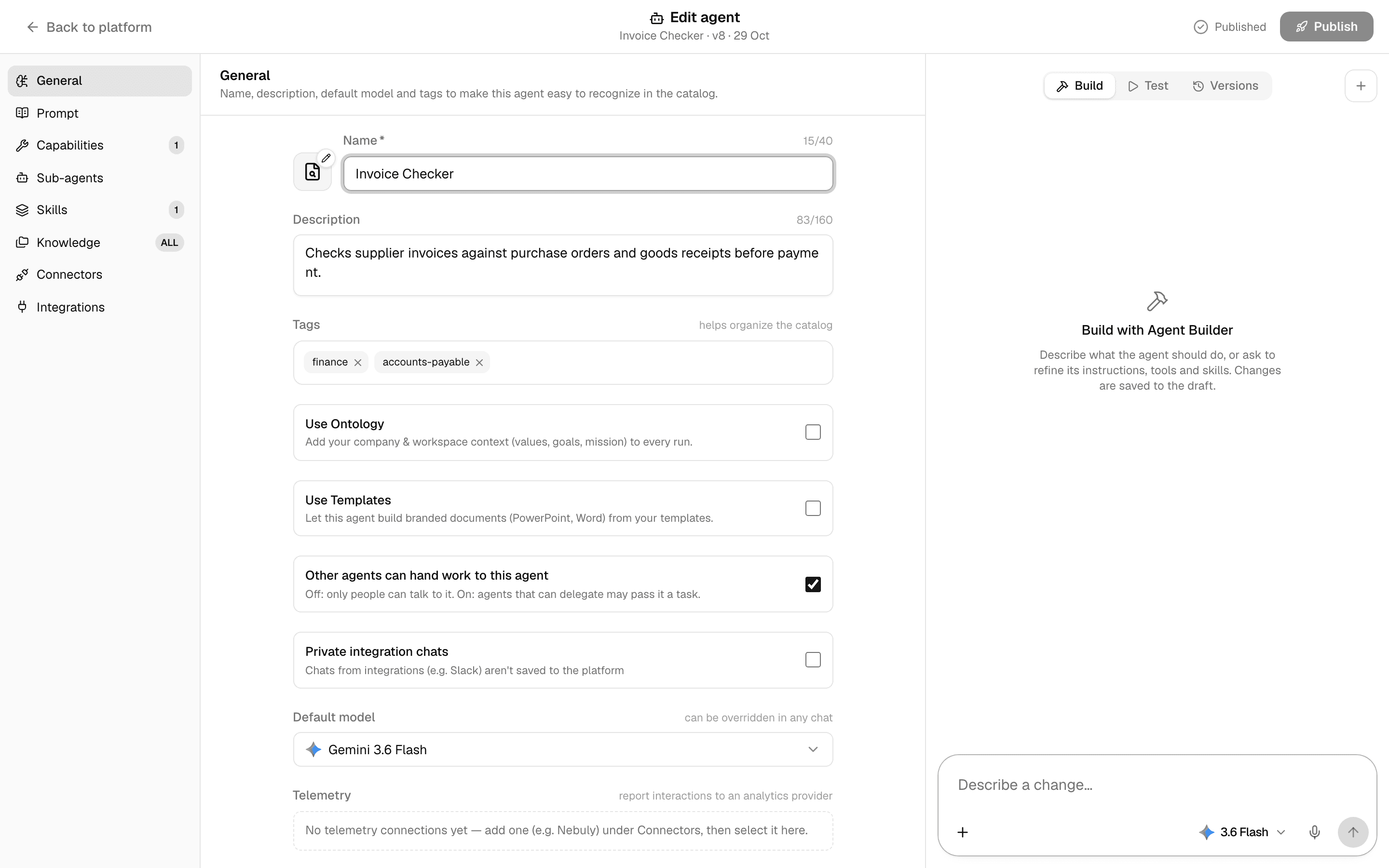
Header
| Part | What it shows or does |
|---|---|
| Back to platform | Leaves the editor. Your changes are already saved to the draft. |
| Create agent or Edit agent | Whether this is a new agent. Below it: the agent's name and its live version and date, or Not published. |
| Saving…, Saved draft, Published | Whether the draft has changes nobody uses yet. Hover for what changed; select Saved draft to roll back. See Test and publish an agent. |
| Publish | Publishes the draft as the next version. Shown to people with the publish permission. |
Every change saves to the draft a moment after you make it; there is no save button.
Build, Test and Versions
| Tab | What it does |
|---|---|
| Build | Agent Builder, a chat that changes the form for you. See Build an agent by chatting. |
| Test | A test chat on the draft. See Test and publish an agent. |
| Versions | The published versions, once there is one. See Versions. |
A number next to a pane counts what is switched on in it.
General
| Setting | What it does |
|---|---|
| Avatar | Select the picture next to the name. Pick an Icon or an Emoji, or Upload a PNG, JPEG or WebP image of up to 5 MB. |
| Name | Required, up to 40 characters. |
| Description | Up to 160 characters. Shown on the agent's card. Other agents read it to decide when to hand this agent work. |
| Tags | Labels for the Tags filter on the Agents page. |
| Use Ontology | Adds your company and workspace context (values, goals, mission) to every run. |
| Use Templates | Lets the agent build branded PowerPoint and Word documents from your templates. |
| Other agents can hand work to this agent | Off: only people can talk to it. On: agents that can delegate may pass it a task. See Sub-agents. |
| Private integration chats | Chats with this agent from an integration such as Slack are not saved in Alomana. |
| Skip content safety screening | Platform admins only. Sends prompts straight to the model without screening, including jailbreak and malicious-link checks. |
| Default model | The model the agent uses unless someone picks another in a chat. If the model is no longer available, choose a new one; saving without one uses the default model. |
| Telemetry | Sends every interaction with the agent to an analytics connection. Add the connection under Connectors first. |
Prompt
The system prompt: the instructions that set the agent's role, tone and rules. A new agent starts with a short general prompt; replace it with your own. The word count shows above the box.
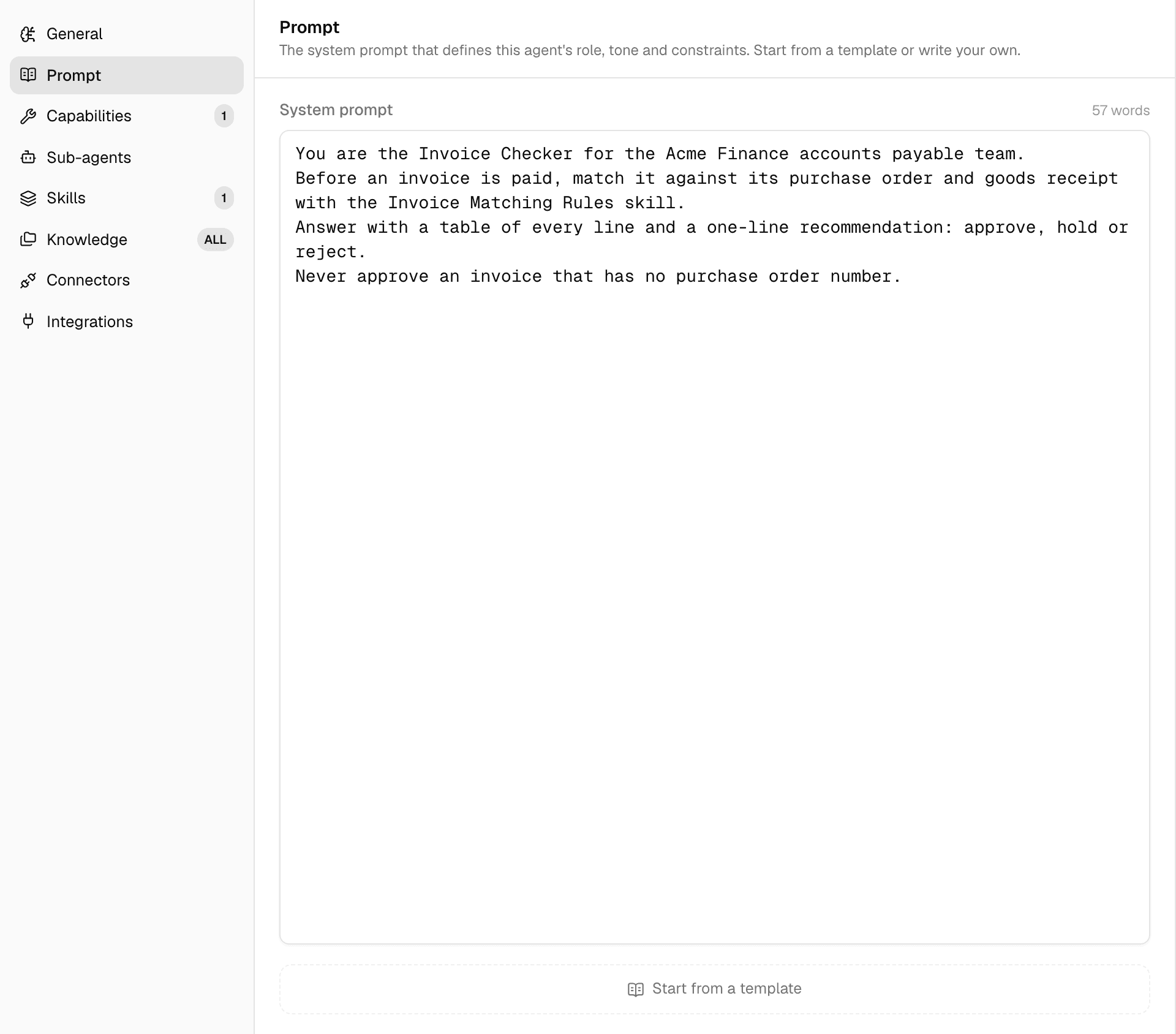
Start from a template at the bottom lists your workspace's and the built-in prompt templates. Picking one replaces the text in the box with the template's and links the agent to it. See Write prompt templates.
Capabilities
The tools the agent can call during a chat. Switch each on or off.
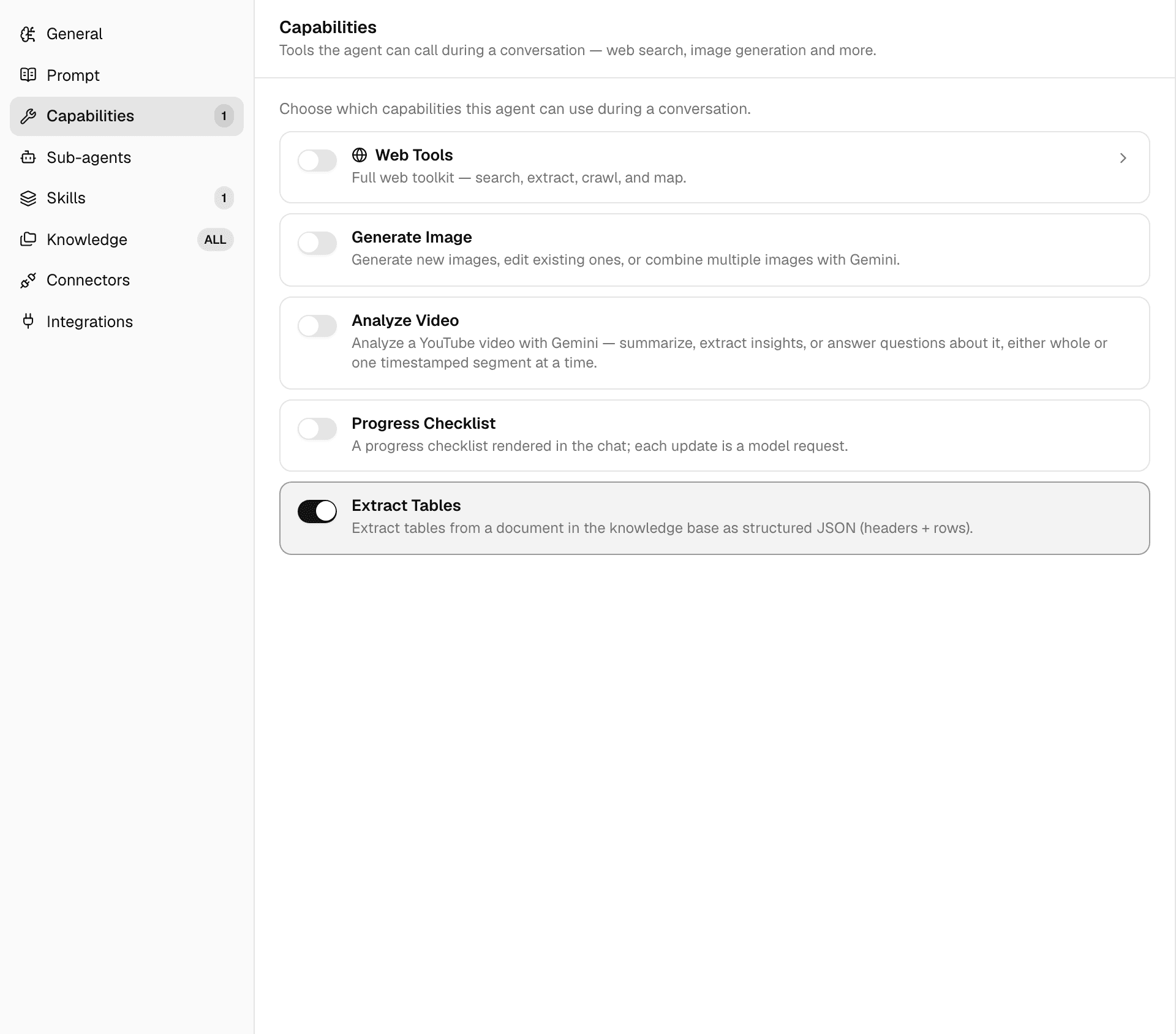
| Capability | What it does |
|---|---|
| Web Tools | Searches, reads, crawls and maps web pages. Select the row to switch individual tools on or off. |
| Generate Image | Creates new images, edits existing ones or combines several. |
| Analyze Video | Summarizes or answers questions about a YouTube video, whole or one segment at a time. |
| Progress Checklist | Shows a checklist in the chat that the agent ticks off as it works. Each update is a model request. |
| Extract Tables | Pulls tables out of a Library document as rows and columns. |
Every agent can also run code, read and write files in its own sandbox and ask you questions; these are not listed. Searching Library files and querying connectors are added by the Knowledge and Connectors panes.
Sub-agents
Let this agent call other agents lets the agent hand self-contained tasks to other agents, either Any callable agent or Only selected agents. See Sub-agents.
Skills
The skills and skill sets the agent can load when a task calls for one, in three tabs: My Skills, Skill Sets and Marketplace. Select a skill or set to switch it on. New skill creates one, uploads a ZIP or opens the marketplace. See Skills.
Knowledge
The Library files the agent searches.
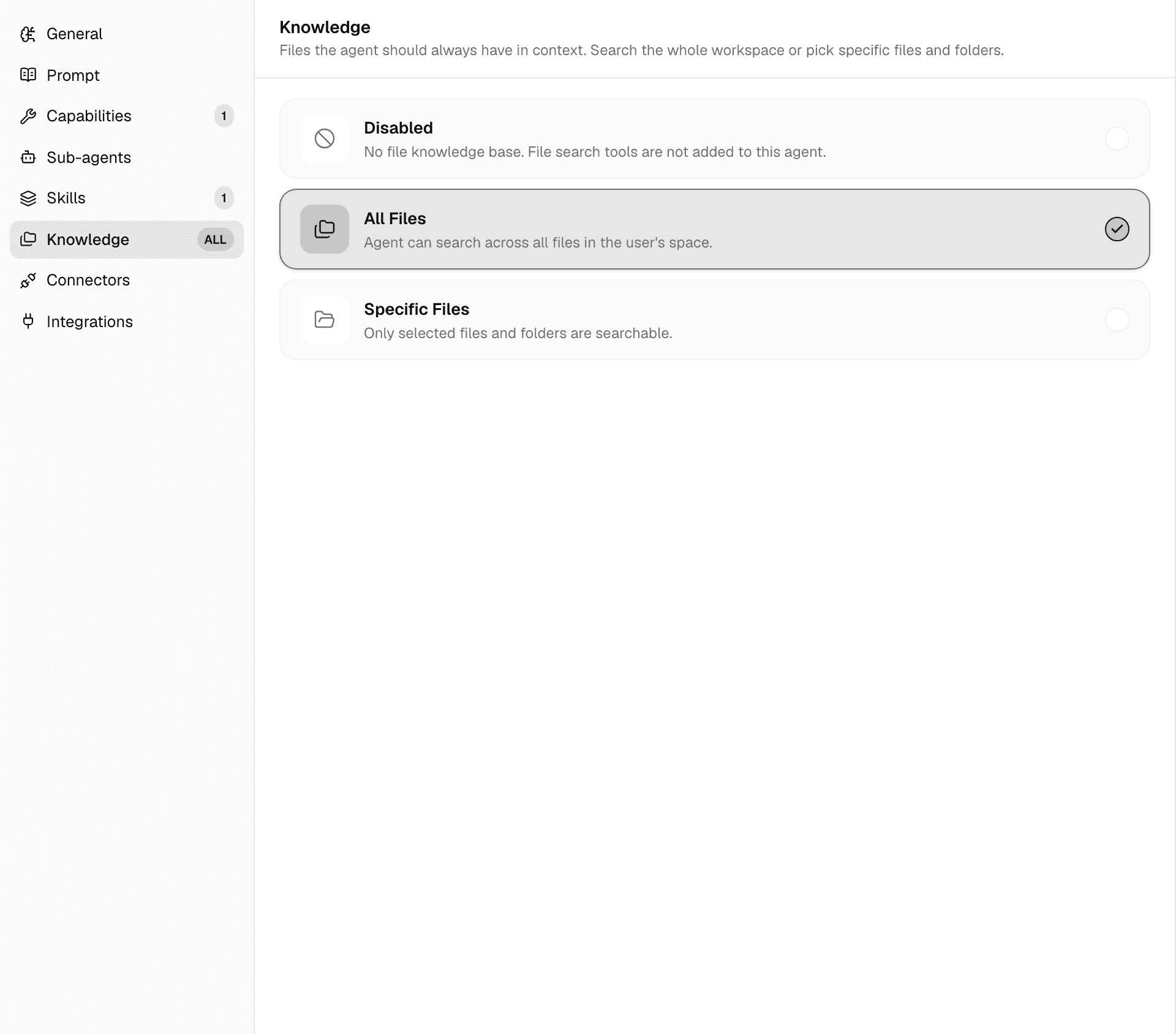
| Option | What the agent searches |
|---|---|
| Disabled | No Library files. |
| All Files | Every file in the Library of the workspace you chat in. |
| Specific Files | Only the files and folders you pick. A folder includes everything in it. |
Files and folders deleted from the Library drop out of the agent's knowledge. See Manage files and folders.
Connectors
The data sources and MCP servers the agent can reach, in one grid. Select a connection to switch it on for the agent; Search connections… and the All and Private filters narrow the grid.
New connection sets one up without leaving the editor: choose the service, or MCP server for a remote MCP endpoint. The new connection is saved as your private connection, and switching it on goes into the draft like any other change, live once you publish.
People chatting with the agent can add more connectors in a chat, but cannot remove these. See Use connectors in chats and agents.
Integrations
Shows whether the workspace's Slack app is connected, so people can mention the Alomana bot in Slack and pick this agent. Only published agents are offered there. See Slack.
To set the same fields with an API key, see Create and configure an agent in the API documentation.
Build an agent by chatting
Describe an agent in the editor's Build tab and Agent Builder fills in its instructions, tools and skills in the draft, ready to test and publish.
Test and publish an agent
Every edit saves to a draft that only editors see. Test the draft, publish it as a numbered version, and roll back or restore earlier versions.