

Share an agent with a magic link
A magic link opens a chat with one agent for anyone who has the link, without signing in.
You need Manage Workspace Settings to open the page and Create magic links, which Editor and Admin have by default. Your plan must include magic links; otherwise Create Link is greyed out with Available on paid plans — upgrade. Open Settings > Magic Links under Workspace · "name".
How a magic link works
- The link always opens the same agent, and one conversation: everyone who opens it sees and continues the same chat.
- The conversation, and the files visitors upload, are saved under your account.
- The page lists only the links you created in this workspace.
- The Agent list offers only the service agents registered on your deployment. Agents built on the Agents page are not offered.
- When no service agent is registered, the list shows No agents registered. and Create Link stays unavailable.
Create a link
-
Select Create Link.
-
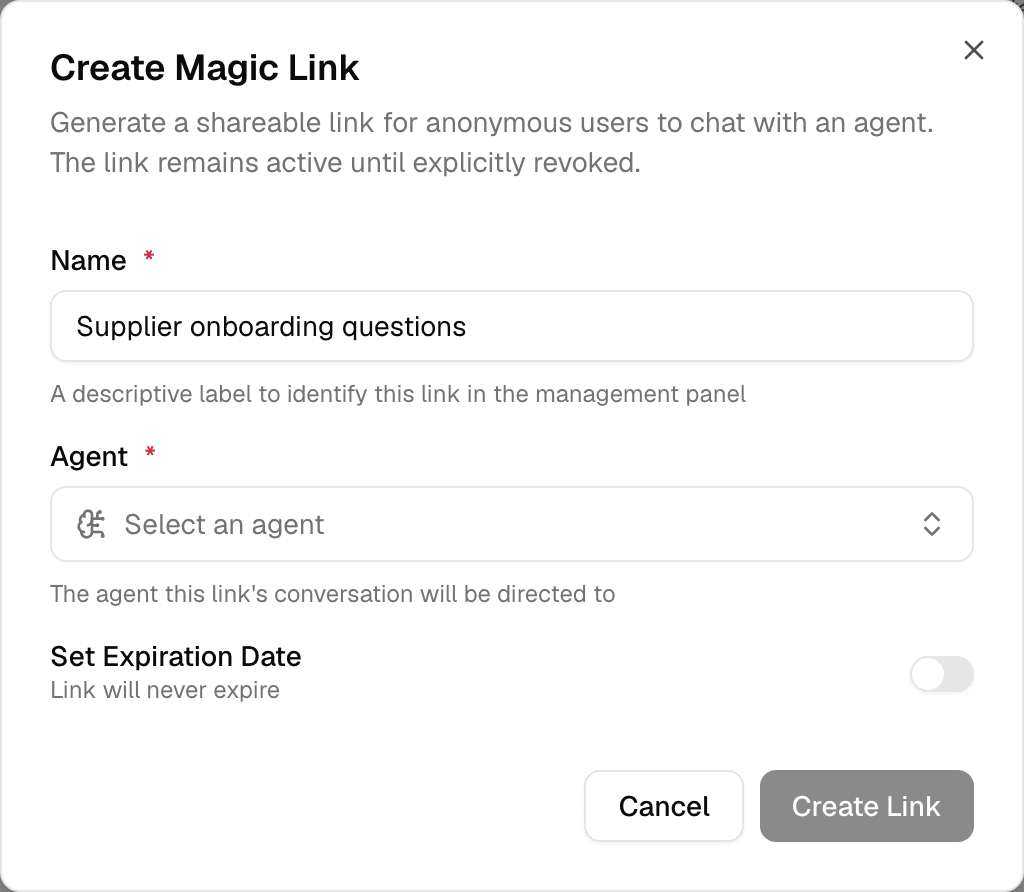
Enter a Name that tells you what the link is for, choose the Agent and, optionally, turn on Set Expiration Date and pick a date.
-
Select Create Link.
-
In Magic Link Created, select Copy URL & Close. The full URL is shown only this once.
Without an expiration date the link works until you revoke it. With one, it stops working after that date.
Regenerate, revoke or delete a link
Use the buttons in the link's Actions column.
| Button | What it does |
|---|---|
| Regenerate URL (preserves history) | Creates a new URL and shows it once; the old one stops working. The conversation is kept. |
| Revoke access | Stops the link at once. Regenerate it later to give out a new URL. |
| Delete permanently | Removes the link. Needs Delete magic links, which only Admin has by default. |
Last Used shows when someone last opened or used the link.
Create workspace API keys
Create an API key that lets a program call Alomana in one workspace, copy it once, and regenerate, revoke or delete it later.
Set up an organization
How an organization is created and joined, how its workspaces join it, and how an admin edits its details, chooses where people land or deletes it.