

Test an agent
A run plays test cases against an agent and scores every answer, or scores chats the agent already had.
Start a run
-
Open Lab > Runs and select New run. Evaluate an agent opens.
-
Under Agent, pick one of your agents and select Continue.
-
Under Goal, pick what to do and select Continue.
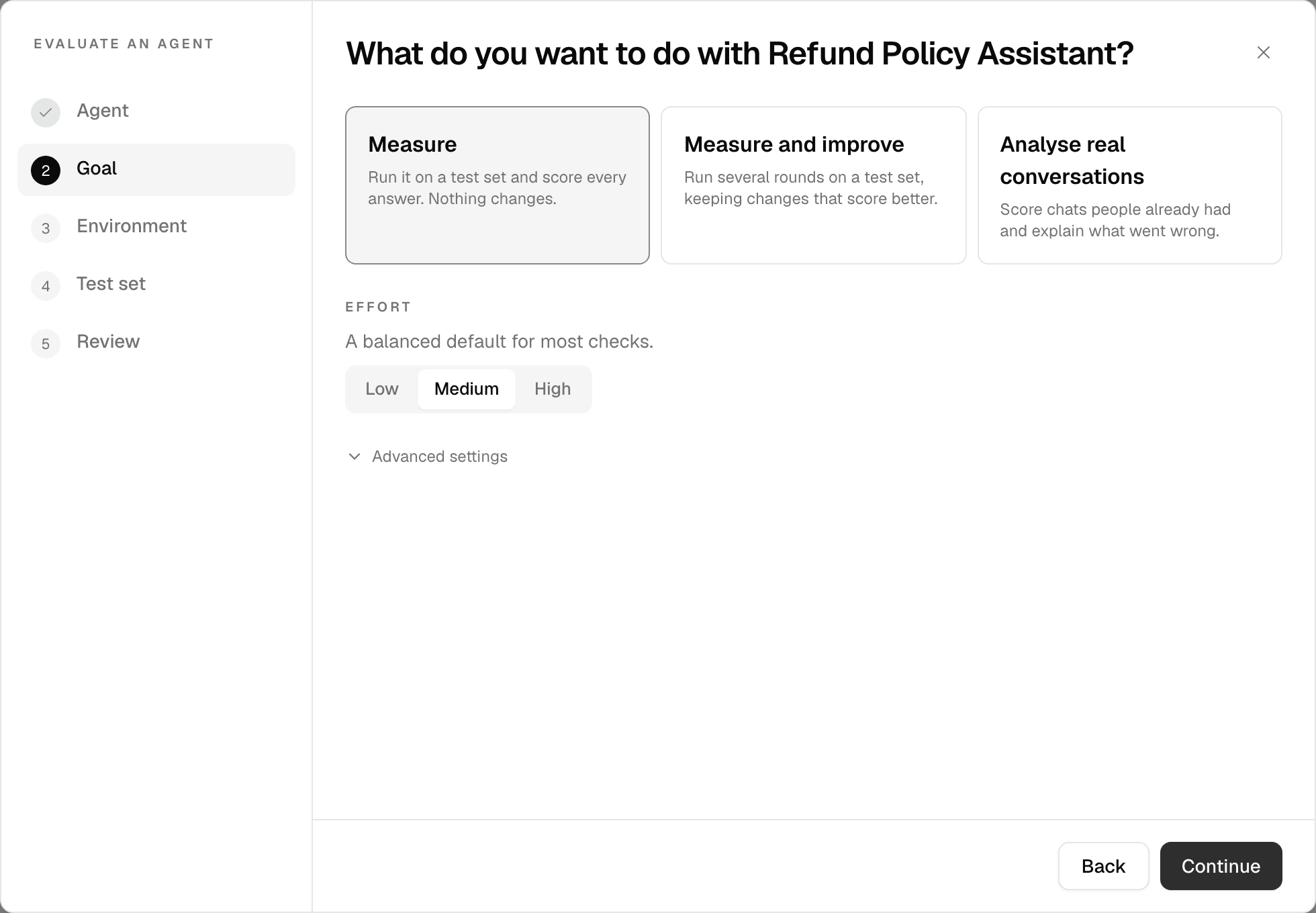
Goal What it does Measure Runs the agent on a test set and scores every answer. Nothing changes. Measure and improve Runs several rounds on a test set, keeping changes that score better. Analyse real conversations Scores chats people already had and explains what went wrong. -
Under Environment, pick a saved environment, or Start from scratch. An environment is used exactly as saved, so the next step is skipped. For Analyse real conversations, the choice is a saved environment's checks or No environment, and you still pick the conversations next. See Build an environment.
-
Under Test set, add Simulated users or Questions, then the Checks. For Analyse real conversations, this step is Conversations: pick the chats to score. Without checks, one overall check scores whether the agent did what the person asked.
-
Under Review, check the summary and select Run evaluation, Start improving or Analyse conversations.
The run appears on Runs. A run that cannot start yet waits as Queued.
Settings
| Setting | Where | What it does |
|---|---|---|
| Effort | Goal | Low: fastest and cheapest. Medium (default): balanced. High: slowest and most thorough. |
| Optimize for | Goal, improve only | Accuracy (default) or Cost: the same quality at a lower price. |
| Approval | Goal, improve only | Automatic (default), or Ask me before each change. |
| What it may change | Goal, improve only | Everything (default), Prompt only or Tools & skills. |
| Advanced settings | Goal, not for analysing conversations | Votes per check, Times to run the agent, Improvement rounds, Minimum improvement and the models, for this run only, or saved as your own default in this workspace. |
| Time per agent turn (minutes) | Review | 1–60, default 10. A turn that takes longer ends the conversation there, and that run fails without being judged. |
| Turns per conversation | Review | 1–20, default Auto: the highest any case asks for. |
A run you set up from scratch holds at most 25 cases.
Follow your runs
Runs lists every run you launched, newest first.
| Column | Shows |
|---|---|
| Run | The environment's name, or Ad-hoc, and the agent. |
| Type | Baseline (Measure), Optimization (Measure and improve) or Diagnosis (Analyse real conversations). |
| Status | Queued, Running, Cancelling, Needs review, Done, Promoted, Rejected, Failed or Cancelled. |
| Score | The run's score, or its cost for a run that optimizes cost. |
| Progress | The round of an optimization, or the number of chats a diagnosis scores. |
| Started | When the run started. |
A certification's measurement also appears here, as an Ad-hoc Baseline run.
Waiting for you counts the runs that need your review. Search with Search runs…, filter with All, Diagnosis or Optimization, and by agent. Optimization also lists Baseline runs.
Open ⋮ on a row:
| Action | What it does |
|---|---|
| Cancel run | Stops a running diagnosis. Partial results are discarded. |
| Re-run | Opens Evaluate an agent with the same environment and goal. Finished runs from an environment only. |
| Download Markdown · Download PDF | Downloads the report. |
| Save as environment | Saves the checks, and the cases of an Ad-hoc run, as an environment. |
| Delete run | Removes the run and its report. This cannot be undone. |
To stop a Measure or Measure and improve run, open it and select Cancel evaluation or Cancel gym.
To compare runs, select two or more finished diagnoses of the same agent and environment and select Compare.
Read the result
Select a run to open it.
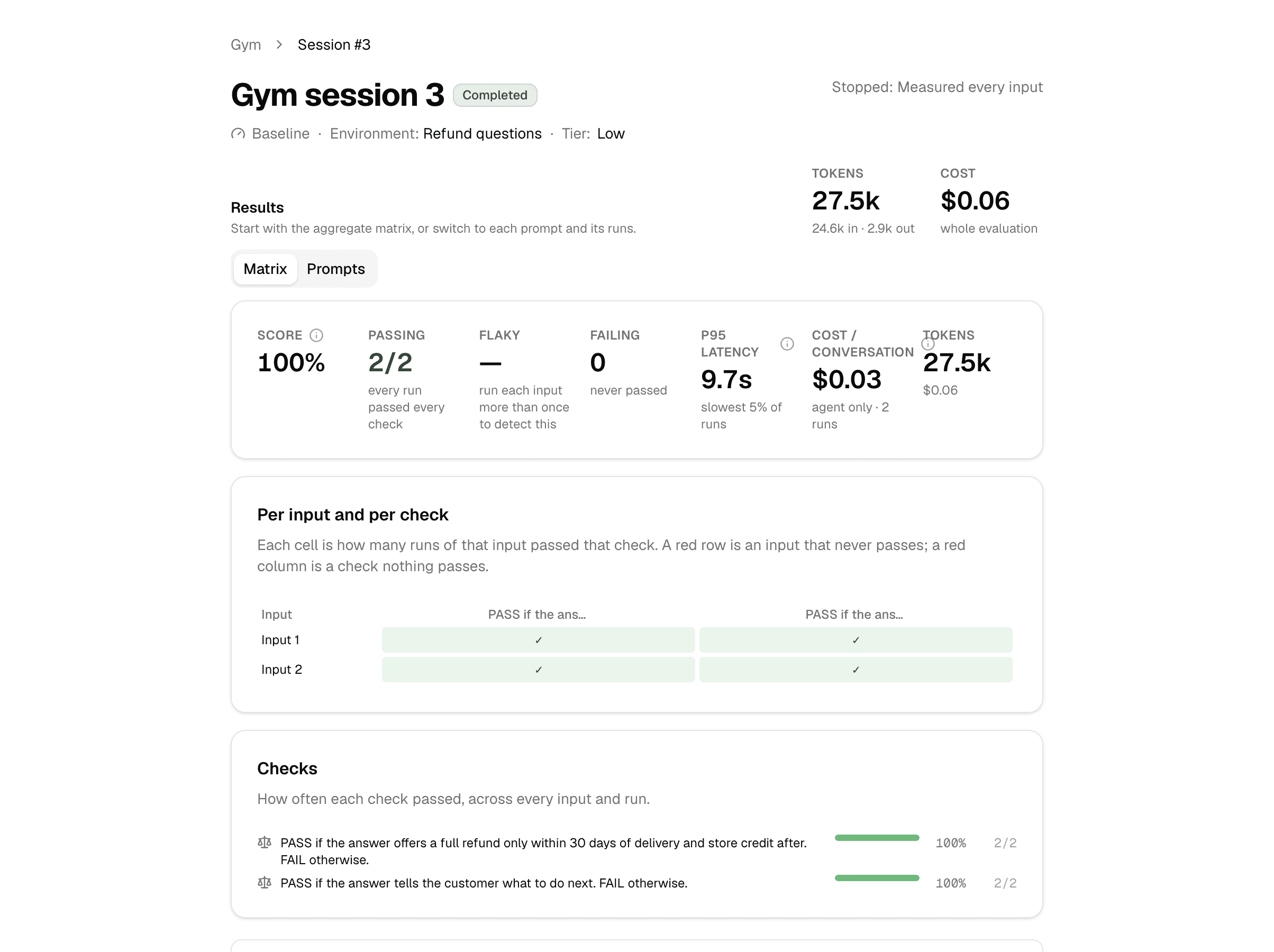
The run's page names it a gym session or evaluation, with its own number.
- Measure shows the Score, the inputs Passing, Flaky and Failing, latency and cost, then Per input and per check and Checks. Prompts shows each input with its runs and conversations.
- Measure and improve shows Best round in detail, the Rounds and the Winning config: what changed in each round and what it scored.
- Analyse real conversations shows Findings, Worth preserving and Recommendations: what fails, why, and what to change.
Keep or discard an improvement
Measure and improve works on a copy of the agent. Your agent does not change.
- With Ask me before each change, the run stops at every proposed change with Needs review: select Accept, Edit, Skip or Stop.
- When the run ends, Keep the tuned agent? offers:
| Button | What it does |
|---|---|
| Promote | Saves the winning configuration as a new agent, under the name you give it. The status becomes Promoted. |
| Reject | Discards the tuned copy. The run and its report stay. The status becomes Rejected. |